FriendCraft build server has changed commited to it. We still use MultiMC for deliverence of some mods. This seems to be still the fastest and cleanest way available.
Java 17
First we need to install .
-
Install Java 17, file JAVA
-
Start installation by double clicking on the downloaded file
-
Click on
Next -
On the next screen the setting for
JavaSoft (Oracle) registry keysshould be turned on.Choose for
Will be installed on local hard drive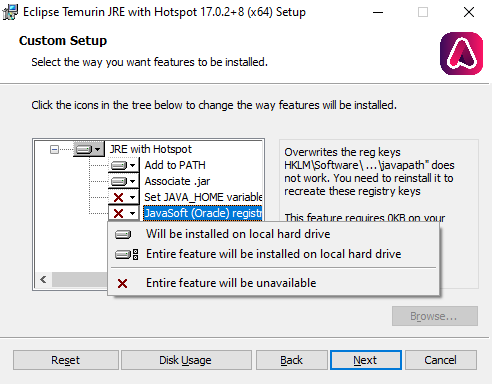 This is the way the settings should be
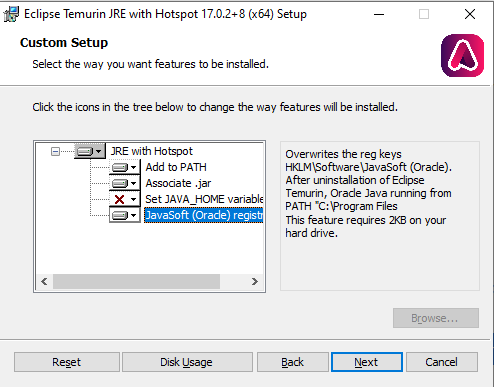 Click on
 Next -
Click on
Install -
Click on
Finish
Now JAVA is installed, next up is MultiMC.
MultiMC
This is a MineCraft Client which can run multiple instances next to each other. But also gives support to MOD-packs. This part we are going to use.
Go to the following link and download: MultiMC Download page and choose your corresponding OS version.
-
Unzip the files on a location easy accessible to you, client-sided mods (USE FORGE VERSIONS). Don’t put them in Program Files. But use your Desktop or My Documents
-
The first time starting the application you have to choose a language. Choose your own preference.
-
Click on
Next. -
On the next screen, you have to choose your JAVA version. Always the choose latest 17 version or higher.
-
In the same screen, you can set the amount of memory MultiMC may use. Set this to:
Minimum:
3000Maximum:
6000 -
Click on
Next. -
Vink het vinkje bij Enable Analytics eventueel uit, als je dat wilt
-
Click on
Next. -
MultiMC is started after that. Click on the topright corner on Profiles and then on Manage Accounts.
-
Choose for in the topright corner what kind of account you want to add. MicroSoft is now the most used one. Follow the onscreen steps.
-
Click on the top-left corner on Add instance.
-
Click on Import from zip.
-
Use the following URL:
https://mc.friendcraft.nl/friendbuild/Build%20Server.zip -
Click on
OK -
Click on Launch on the right side of the screen or double click on the freshly added icon.
In the background it will download and install the latest mods added in the pack!